Brother Printer Toner Cartridges

Brother Printer Toner Cartridges

Our Compatible brand cartridges allow you to print with peace of mind. Our Inkjet & Laser toner cartridges and imaging drum units are sourced from Quality Assured Factory, helping you buy in confidence.

Save up to 75% with London Toner Cartridge’s own-brand of Inkjet and Toner Cartridges and imaging drum units Guaranteed alternatives to the original brands

With many happy and satisfied customers, Whom we helped to save money by switching to our Compatible Replacement printer cartridges and in our opinion we are by far the best money saving third-party printer cartridges distributor who offers value for money quality products with FREE DELIVERY in the UK on all purchases regardless of value.

Full 2-year warranty

Plus our Compatible Brother Cartridges Won’t invalidate your printer warranty

Let us assist you to Switch and help save you money on your printer cartridges from today plus all the plastic and metal parts in our printer cartridges are recyclable and are kind to our environment.

Free Next Working Day Delivery within the UK and the lowest price guaranteed.

Click here to check all our Brother Printer Cartridges and Drum Units

Click here to excess Brother Inkjet, Toner cartridges plus Imaging drum units

If you don’t find your printer cartridge or drum unit please call us on 07850 262918

Product Features: 

High Performance and Excellent Quality

Cartridges Fitted with the Latest Chip 

Maximum High Yield Cartridges Capacity 

Each Cartridge Tested to Meet Quality Standard

Manufactured in an ISO9001 and ISO140001 Certified Factory Our range of NON OEM Compatible Laser Toner Cartridges are manufactured to the highest quality and standards. Fully guaranteed by our 100% Satisfaction Guarantee policy, tested to provide the best image quality and most reliable printing you can count on page after page.

*Product pictures may slightly differ as we buy in quantity and sometimes batches may change or alter with the manufacturer. (Brand names and trademarks are the property of their respective owners. This Toner Cartridge is a compatible product NOT an O.E.M product.)

From Negatives to Pixels: Unleash the Power of the Best Photo Scanners

Best Photo Scanner for Old Photos

There are several excellent photo scanners available on the market that can digitize old photo negatives. Here are a few options to consider:

Certainly! Let’s delve into more details about each of the mentioned photo scanners and their features:

  1. Epson Perfection V800/V850: These scanners are highly regarded for their exceptional scanning capabilities. They offer a high optical resolution of up to 6400 dpi, which ensures excellent detail and sharpness in scanned images. The V850 model includes an additional set of film holders, allowing you to scan a broader range of film formats, including 35mm, medium format, and large format negatives. Both scanners use Epson’s Dual Lens System, which automatically selects the appropriate lens for the desired resolution, ensuring optimal image quality. The scanners also feature Digital ICE technology, which helps remove dust and scratches from negatives, saving you time on manual retouching.
  2. Canon CanoScan 9000F Mark II: This scanner is a popular choice due to its versatility and affordability. It offers a high optical resolution of up to 9600 dpi, enabling detailed scans of both prints and negatives. The scanner comes with film holders for 35mm negatives and slides, as well as medium format film. It features Canon’s FARE Level 3 technology, which can automatically correct for dust and scratches on the film. The CanoScan 9000F Mark II is easy to use and produces good-quality scans, making it suitable for both beginners and enthusiasts.
  3. Plustek OpticFilm 8200i SE: This scanner is specifically designed for film scanning and is well-regarded among film enthusiasts. It offers an optical resolution of up to 7200 dpi, allowing for highly detailed scans. The OpticFilm 8200i SE supports various film formats, including 35mm negatives and slides. It comes with SilverFast SE Plus 8 software, which provides advanced features for color correction, dust and scratch removal, and image enhancement. The scanner also features an infrared channel that helps detect and remove dust and scratches from the film during the scanning process.
  4. Nikon CoolScan 9000 ED: Although this scanner is an older model and may be harder to find, it remains highly regarded for its exceptional scanning capabilities. It supports a wide range of film formats, including 35mm, medium format, and large format negatives. The CoolScan 9000 ED offers an optical resolution of up to 4000 dpi and features Nikon’s advanced scanning technologies, such as Digital ICE4, which automatically corrects for dust and scratches. The scanner’s high-quality optics and precise film handling deliver excellent image quality.

When choosing a photo scanner, it’s important to consider factors such as scanning resolution, film format compatibility, software features, ease of use, and your budget. Additionally, reading user reviews and comparing specifications can provide valuable insights into the performance and reliability of each scanner.

Best Printer for Home use with Cheap ink

In today’s fast-paced world, having a reliable home printer is a necessity for many individuals and families. Whether you need to print documents for work, school assignments, or personal use, having a printer that is both cost-effective and user-friendly can save you time, money, and frustration. In this article, we will explore the five best home printers available in the UK that not only offer great value for your money but also come with affordable and compatible ink cartridges.

  1. Epson Expression Home XP-4100: The Epson Expression Home XP-4100 is a standout printer that combines affordability and functionality. With its compact design and intuitive control panel, this printer seamlessly fits into any home office or living space. Its high-quality printing capabilities allow you to produce sharp text and vibrant images with ease. Moreover, the XP-4100 is compatible with a wide range of ink cartridges that won’t break the bank. This printer offers a superb value proposition for those seeking an affordable yet reliable option.
  2. Canon PIXMA TS5350: The Canon PIXMA TS5350 is a versatile printer that excels in both performance and convenience. Its sleek and modern design adds a touch of elegance to any room. With wireless connectivity options, you can easily print from your smartphone, tablet, or computer, making it a breeze to print your documents or photos on the go. This printer is known for its affordability, and it’s no different when it comes to ink cartridges. Compatible cartridges for the PIXMA TS5350 are readily available at affordable prices, ensuring that you can keep printing without breaking the bank.
  3. HP DeskJet 3760: When it comes to compactness and affordability, the HP DeskJet 3760 is hard to beat. This all-in-one printer offers a space-saving design without compromising on functionality. It supports wireless printing, allowing you to print directly from your mobile devices. With its user-friendly interface, even those with minimal technical know-how can effortlessly set up and operate the printer. The DeskJet 3760 offers excellent value for money, and its compatible ink cartridges are budget-friendly, making it an ideal choice for cost-conscious consumers.
  4. Brother DCP-J774DW: For those seeking a reliable printer with advanced features at an affordable price, the Brother DCP-J774DW is a top contender. With its wireless capabilities and automatic double-sided printing, this printer provides convenience without sacrificing performance. Its compact design fits seamlessly into any home office or workspace. Additionally, the DCP-J774DW is compatible with affordable third-party ink cartridges, ensuring that you can maintain your printing needs without incurring exorbitant costs.
  5. Samsung Xpress M2026W: The Samsung Xpress M2026W is a monochrome laser printer that delivers exceptional performance and affordability. Ideal for individuals or small businesses, this printer produces high-quality prints at impressive speeds. Its wireless connectivity options allow for effortless printing from a variety of devices. While laser printers are typically associated with higher running costs, the Xpress M2026W defies that stereotype by offering affordable compatible ink cartridges, making it an economical choice in the long run.

Conclusion: Investing in a home printer that strikes a balance between affordability and ease of use can significantly enhance your productivity and convenience. The Epson Expression Home XP-4100, Canon PIXMA TS5350, HP DeskJet 3760, Brother DCP-J774DW, and Samsung Xpress M2026W are all excellent options that offer a combination of cost-effectiveness, user-friendly features, and compatibility with affordable ink cartridges. By choosing any of these printers, you can enjoy the benefits of hassle

Ink Cartridge Discount Code

Hello and Welcome

Ink Cartridge Discount Code

Download Link at bottom of this page for our Discount Code

Ink Cartridge Discount Code

Ink Cartridge Discount Code

We offer 100% satisfaction guarantee on all our compatible inkjet and laser toner cartridges PLUS imaging drum units. Free UK delivery and returns – try us risk free.

At London Toner Cartridge we understand with economic impact we are all are currently facing.

The increases in the cost of living are likely to affect the rest of the economy, as household budgets are squeezed. There has already been increase in cost of living across many families in the UK and it continues to rise.

Yearly expansion in the UK in May 2022 arrived at its most elevated level starting around 1992, at 7.0%. Costs have been ascending across practically all areas of the economy; however fuel and energy have been especially observable: petroleum costs rose by more before end of 2022 than in some other month since records started in 1990, while the Ofgem energy cost cap expanded on 1 April by 54% contrasted with the past cap.

Russia’s ongoing invasion of Ukraine continues to affect the energy and other product prices, which is expected to keep these price increments high for some time. In UK we expect there will be increases in poverty, particularly if the prices rise any further than what they are, and the effect could be “truly horrific”.

The increases in the cost of living are likely to affect the rest of the economy, as household budgets are squeezed.

We are all exploring new ways of saving money on products we buy either they are for our home or for business to reduce the burden faced we are facing due economic crisis,

Therefore even small items which we use either at home or for our business have to be within our budget and we at London Toner Cartridges understand it is important to save MONEY ON REGULAR BASIS.

Click Here to Download ink cartridge discount code

Permanent solution for BT wifi connection problems

BT wifi connection problems

If you are experiencing problems with your BT wifi connection, there is a solution. Here are a few tips to help you get started:

  1. Make sure that your BT wifi router is up to date. This will help to ensure that the network is functioning properly.
  2. If you are experiencing problems with your BT wifi connection, try resetting your BT wifi router. This will clear any existing issues and should help to restore your connection.
  1. If resetting your BT wifi router does not help, you may need to consider installing a new BT wifi router.

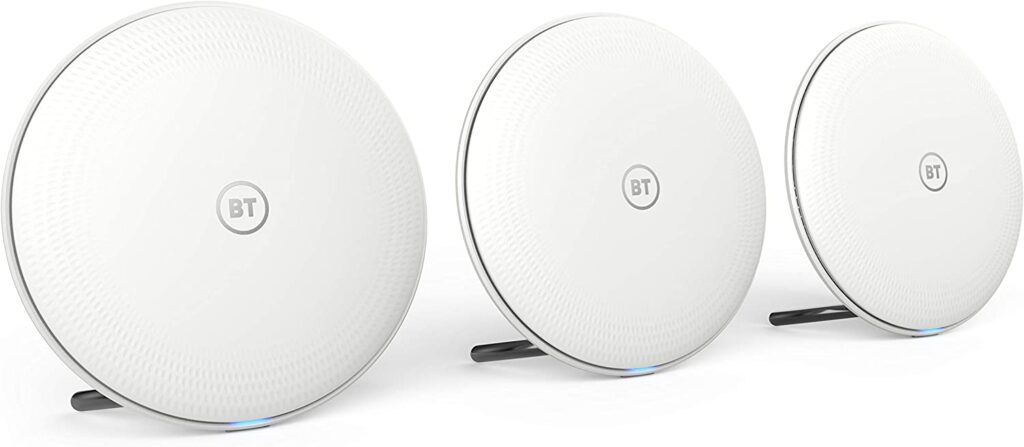
If you are looking for a reliable and secure wifi system for your whole home, then BT Whole Home WiFi System is an ideal choice.

BT wifi connection problems

This system comes with a range of features such as easy installation, coverage for up to 5,500 square feet, and advanced security.

With the help of this system, you can enjoy an uninterrupted internet connection throughout your home and enhance your online experience. article, we will discuss the features and benefits of BT Whole
Home WiFi System and why it is the right choice for your home.

Features

When it comes to home networking, your options can be overwhelming. But don’t worry, because with BT Whole Home

WiFi, you can get everything you need in one convenient package.

BT Whole Home WiFi provides a comprehensive network solution for your whole home. With a range of features to choose from, you can connect all your devices, whether you’re looking to stream your favorite show or power your entire home.

Plus, with BT Whole Home WiFi, you can be sure that you’re getting the best possible performance. Our system is built with a robust set of features, so you can be sure that you’ll be able to enjoy your media seamlessly.

Advantages

When shopping for a whole home WiFi system, it is important to consider the advantages of BT Whole Home WiFi over other systems.

One of the main advantages of BT Whole Home WiFi is that it is backward compatible with older routers.

This means that you can connect your older routers to the BT Whole Home WiFi system and continue to use them without having to upgrade them.

BT Whole Home WiFi is also highly reliable. This means that if there is a problem with your WiFi network, the BT Whole Home WiFi system will usually be able to fix it.

Finally, BT Whole Home WiFi is easy to set up. This means that you can get started quickly.

Setting Up

Setting up your BT Whole Home WiFi System is a breeze!

Once you have the BT Whole Home WiFi System set up and configured, you will be able to easily access your home network from anywhere in the world.

You can even access your home network from your mobile devices! You will also be able to access your home network from any internet-connected device, including your computer, smart phone, or tablet.

The BT Whole Home WiFi System is a great way to stay connected and organized at home.

Stay Connected

When it comes to staying connected, nothing beats the convenience of having a whole home WiFi system.

Not only does this provide seamless internet access throughout your home, but it can also help cut down on cable and satellite bills.

Plus, you can always rely on a whole home WiFi system to keep your devices connected no matter where you are in the house.

If you’re looking to invest in a whole home WiFi system, BT is a great option.

Not only do they offer some of the best prices around, but their systems are reliable and easy to use. Plus, their whole home WiFi systems come with a host of features, like automatic network switching, password protection

Automatic Network Switching
When you set up your BT Whole Home WiFi System, you can automatically have your devices connect to the strongest network. This means that you can focus on what you are doing, and your devices will connect to the best network.

Password Protection

When it comes to protecting your home WiFi network, one of the best ways to do so is by using a password. With BT Whole Home WiFi System password protection, you can ensure that your network is protected from unauthorized access.

To set up BT Whole Home WiFi System password protection, you first need to create a password. Once you have created your password, you need to set it up as a security measure for your network. You can do this by entering your password into the network settings on your devices.

In addition to password protection, you can also use the BT Whole Home WiFi System to manage your network. This allows you to track your network usage.

Benefit and Value for Money.

When it comes to home WiFi systems, there are a lot of options available to consumers. One of the more popular systems on the market is the BT Whole Home WiFi System. This system is designed to provide a comprehensive WiFi network throughout a home.

One of the main benefits of this system is that it can be installed quickly and easily. The system is compatible with a variety of devices, so everyone in the home can access the network. Additionally, the system is reliable and offers a high level of coverage.

Overall, the BT Whole Home WiFi System is a great option for consumers who want a comprehensive WiFi network in their home. It is easy to set.

printer cartridges voucher code coupon uk

What are Basic Computer Hardware Components

What are Basic Computer Hardware Components

What are Basic Computer Hardware Components

Basic Computer Hardware Components

There are five main hardware components in a computer system: Input, Processing, Storage, and Output and Communication devices. Are devices used for entering data or instructions to the central processing unit?

In order to function properly, a computer needs to have the right hardware components in place. These components are the motherboard, CPU, GPU, PSU, Internal Disk Drive and RAM Memory.

The motherboard is the nerve centre of any computer. It is responsible for controlling all of the other peripheral hardware like hard drives and display screens.

The CPU (central processing unit) is one of the most important parts of your computer because it controls everything from booting up to running applications.

GPU stands for graphics processing unit which is responsible for generating an image on your screen as well as displaying it in an efficient fashion.

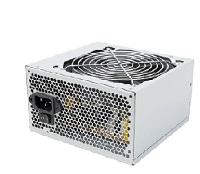
A power supply unit (PSU) provides power to your system by converting standard outlet power into lower voltage levels that are safe for electronics such as computers, televisions and stereos.

What are Basic Computer Hardware Components

Components of computer hardware

Computers are a complex system of hardware and software. The hardware includes different types of components that all work together to process the data and produce what we see on the screen.

The motherboard is the main circuit board where all the components are connected, forming a single unit. The CPU is the brain of a computer which processes data and controls other components inside it – like RAM, GPU or hard drive.

The power supply unit provides power to all the electronic components in your computer. It converts alternating electric current into direct current (DC) so that it can work with your battery and other devices as well.

The motherboard also has slots for RAM memory which helps improve performance by storing frequently used data closer to memory access point so that it can be processed more quickly.

Every computer system has a motherboard that serves as the “brain”, connecting all of the other components. The CPU is an important component in a computer, performing essential calculations and executing programming instructions. The GPU, memory, storage unit and power supply are also essential and work hand-in-hand with these components.

Motherboard:

The motherboard is the main circuit board of a computer system. It connects all the other components together to make them function as one machine.

Central processing unit (CPU):

The CPU performs calculations and executes programming instructions in order to control every function of your PC or laptop. It can be called the brain of your PC or laptop.

Graphics Processing Unit (GPU) :

The GPU enhances graphics performance by accelerating image creation while reducing load on the CPU to help with both gaming and video editing tasks

Power supply unit (PSU):

The PSU converts alternating current electricity into direct current electricity for use by PC’s internal hardware

Computer hard drive components that are necessary to make a computer work.

Internal Hard Drives

HDD Hard Drive & SSD Solid State Hard Drive

The first component is an internal disk drive, which is typically a hard drive or solid-state drive. This component requires an interface to the motherboard in order to store data and read or write data. This interface can be SATA, IDE, or SCSI.

Optical Disk Drives

Optical disk drives allow users to read and write optical disks in order to read data from a CD, DVD, or Blu-ray disc. These interface hardware component are connected internally with cables to the motherboard.

Disk drives are devices that store and retrieve data on a disk. Internal disk drives are installed inside the computer. Optical disk drives read and write data via a laser beam that is focused on a spinning disk, which holds the disks in place.

Internal Disk Drive: A hard drive, also called an HD (hard disc), is an electronic device used to store data by rotating rigid platters coated with magnetic material at high speeds. The hard drive further includes one or more data recording surfaces (data platters) on which recorded information can be magnetically written or read using heads, arms and other components that control movement relative to the surface of the platter. Data is stored in the form of closely packed magnetic regions on the platter surface which represent binary code. This code can then be read by a computer’s hardware for processing as software programs, video games etc.

USB Flash Drives

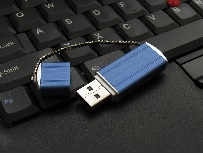
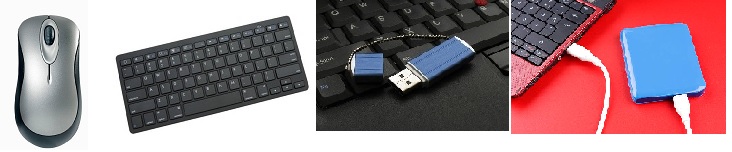
USB Key: USB keys are small hardware devices designed to allow you to transfer large amounts of data from one location they come in 2 different formats ….USB 2 and USB 3

Additionally there are Basic external computer hardware

What are Basic Components external hardware

Mouse. A mouse is a hand-held pointing device that moves a cursor around a computer screen and enables interaction with objects on the screen. …

Keyboard. …

Microphone. …

Digital Camera. …

USB External drive. …

What is a Transfer Belt on a Laser Printer

What is a Transfer Belt on a Laser Print

What is a Transfer Belt on a Laser Print

Laser Printer Laser Belts

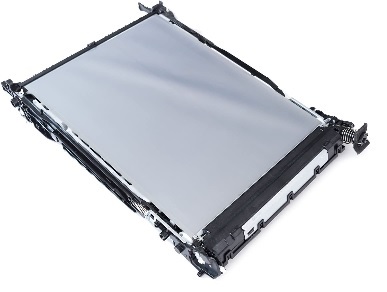
A transfer belt is a piece of rubber that sits between the fuser and the paper tray. It contains an oil-impregnated felt material, which transfers ink from the fuser to paper.

It can be a problem when it gets old or dirty because it can cause printing problems such as blotches, streaks, gaps and faint images.

To clean, use a lint-free cloth moistened with water and alcohol in equal parts.

 Wipe gently in one direction all over the surface of the transfer belt.

A transfer belt is an important component of the laser printer that helps transfer toner to paper. It is usually in the shape of a belt, hence the name.

The laser printer transfer belt can be damaged if it gets clogged with dust and debris. It may also get scratched and will not work as well to produce high-quality copies when it isn’t clean.

The easiest way to clean a laser printer transfer belt is with a vacuum cleaner or compressed air canister.

A transfer belt is a component found on laser printers. It is located inside the printer and helps to move the printed page to start the process of being fed out of the printer. Essentially, it is what helps to eject pages from a laser printer.

Typical problems with a transfer belt include smudging, discoloration and other types of wear-and-tear. One way to deal with this problem is by cleaning your laser printer transfer belt by hand or using a product like “Laser Cleaning Gel” which provides quick and effective results for most customers in need of help.

What is a Transfer Belt on a Laser Print

A printer transfer belt is a type of roller that transfers the printed pages from the printer to the paper collection tray.

The transfer belt, like other parts of an inkjet or laser printer, may require periodic cleaning to remove dirt, dust and other particles that can cause damage during operation. The process for cleaning a transfer belt on a laser printer is as follows:

-Turn off your printer, unplug it from the power source and wait 10 seconds to allow any current electrical discharge from the power source to die down before you touch anything.

-Open the front or back cover of your laser printer. The location varies depending on your model and design, you’ll need to consult your user manual for guidance. -Remove the toner cartridge while avoiding touching the inside surface with your fingers or clothing as this will leave behind unwanted oils and dirt which will make it more difficult to clean.

-Use compressed air to remove all debris from inside the machine if necessary (particularly

The transfer belt is a critical part of any laser printer. The toner on the transfer belt is transferred to paper and creates the black and white copy of your document.

The transfer belt has a limited life span, as it can wear out over time. If your transfer belt is not working efficiently, you will see horizontal lines in your copies or streaks in your prints. This article will tell you what to do if you want to clean or replace it for optimal efficiency again.

Overview: A laser printer transfers black ink onto paper using a cold laser beam that melts the toner which creates the black and white copy of documents being printed on it (1). The transfer belt is an important part of this process because it acts as one side of an electrostatic system – with the other side being formed by a negatively charged developer roller (2). The toner particles are attracted to the surface of this roller, while they are repelled from its sides (3). This charge on both

A transfer belt on a laser printer is an important part of the imaging process. It transports the freshly inked image from the toner drum onto paper.

The process starts when high-speed toner powder is melted and then distributed evenly on the surface of the transfer belt. The hot roller then transfers this mixture to paper, which is then transported by a drive roller to a separate location in preparation for printing.

The most common problem with a laser printer might be that it jams during printing or there is an excess of toner powder on your printout, so it’s important to clean your printer if you find these problems to fix them as soon as possible. This will also help extend the lifetime of your machine since these problems are caused by issues with how your printer parts are changed over time and not just one day out of nowhere.

Laser Printer Laser Belts

The Best Small Black and White Printer

The Best Wireless Black and White Printer – Brother MFC-L2750DW The Brother MFC-L2750DW is the perfect wireless black and white printer for small businesses and home office. It prints quickly, provides high quality output, and has a easy to use interface and the Toner cartridge and imaging drum units cost less compared to other Laser printers on market

1. Brother MFC-L2750DW – The best wireless black and white printer for small businesses and homes offices

The Brother MFC-L2750DW is the perfect wireless black and white printer for small businesses and homes offices. It prints quickly, provides high quality output, and has a easy to use interface.

2. Print fast – This printer can print up to 34 pages per minute

Print directly from your smart phone with easy simple steps

Mono multi-functional printer – print, copy, scan and fax
Automatic duplex printing (Can automatically print double sided documents)
Print speeds up to 34ppm
Scan speeds: mono 23.6ipm (ADF), colour 7.5ipm (ADF)
Resolution: Print and scan up to 1200 x 1200dpi, copy up to 600 x 600dpi
Paper inputs: 250 sheet capacity paper tray, 1 sheet manual feed slot, 50 sheet ADFe

3. High quality output – The Brother L2750DW produces high-quality printed documents

4. Easy to use interface – The Brother MFC-L2750DW has an easy to use, intuitive interface which makes printing, scan, copy and fax quick and simple

5. Compact design – This printer is small and compact, perfect for small spaces

In addition, the Brother MFC-L2750DW also supports the following features:

5. Documents that are printed using this printer can be easily shared with others using the Brother print software, which provides users with a range of helpful tools and functions

Plus, if you need to print documents from a computer that is not connected to the printer, the Brother MFC-L2750DW supports wireless printing so you can still complete your task without having to go through the hassle of connecting a cable.

Moreover, the Brother MFC-L2750DW comes with a 1 year warranty and is backed by our friendly customer service team who are available 24/7 to help you whenever you need it.

Furthermore, if you’re looking for a good wireless black and white printer that is perfect for small businesses or homes offices, the Brother MFC-L2750DW is the best option available.

In conclusion, the Brother MFC-L2750DW is a great wireless black and white printer that can provide high quality output and is easy to use.

Refilling Laser Toners Cartridge for Printers

Laser Toners Cartridge for Printers

Refilling Laser Toners Cartridge for Printers


Refilling Laser Toners Cartridge for Printers

Many people are not sure about the benefits or risks of refilling printer and toner cartridges. We would like to take this opportunity to provide you with information about the benefits of refilling your empty printer and toner cartridges. Refilling your empty cartridges is a cost-effective way to save money on buying brand new ones, and can also help reduce environmental waste as well as provide better value for money.

At London Toner Cartridge we specialise in providing customers with compatible printer and toner cartridges that are manufactured, tested to ISO 9001 Quality Assured quality and then packaged ready for dispatch.

At London Toner Cartridge we often get asked by our customers whether having your printer toner ink cartridges refilled is a good idea. The answer to this question really depends on what type of device you are using, for what purpose and how often you use it.

We will cover some of the basics about printer cartridge refilling and then give more details about compatible laser toner cartridge in particular.

Though the availability of printer toner and ink cartridges is increasing, it is still not enough. There are many people who choose to refill their cartridge instead of buying a new one. At London Toner Cartridge we have an extensive range of compatible printer toner and ink cartridges and offer a cost effective printer cartridges’. Though you may have some reservations about refilling your printer cartridges, it is a very easy process that can save you a lot of money but it costs than brand new compatible laser toner or ink cartridge supplied by London Toner Cartridge

Here are some facts that may help to persuade you:

– Buying compatible printer ink or laser toner cartridge will save you up to 85% on the original OEM BRAND price.  These savings add up over time.  This also applies to HIGH YIELD CAPACITY laser toner cartridges – they can last for around 18000 pages on some models when they are properly USED, as opposed to 6000 pages if they were simply replaced with standard toner cartridges.  This means that for laser printers with an average output of 6000 pages per month can be spending more money on refilling there cartridges.

In short Compatible Toner and Ink Cartridges cost less than refilling your empty cartridges with guaranteed printing quality page after page. Click Here to visit our webshop use Quote nzvmfzm7 at website checkout or use it for phone ordering call 07850 262918

refill toner near me